Cisco ISE Production Deployment on AWS
Purpose & Background
Cisco Identity Services Engine (ISE) provides network access control (NAC), RADIUS/TACACS authentication, authorization, accounting, and policy enforcement services.
This document describes the Production deployment of Cisco ISE on AWS, including:
- infrastructure components
- failover mechanism
- health checks
- operational guidance
High-Level Architecture
Two Cisco ISE nodes are deployed on EC2 forming a TACACS cluster across two availability zones.
RADIUS/TACACS traffic health is actively managed by a UDP Lambda probe, which performs a real RADIUS check on port 1812 and dynamically registers or deregisters nodes from the NLB target groups.
Admin traffic on TCP/443 is not automated via Lambda. Instead, the Admin NLB always registers only one node at a time, controlled via Terraform.
Components
VPC
Network Operations Centre VPC
vpc-035cbba5e5264a6bc
EC2 Instances
Deployed across two Availability Zones.
TACACS Cluster
Two EC2 instances are used:
TACACS1
- Instance name:
MOJ-NS-NOC-ISE-TACACS001 - Private IP:
172.27.3.63 - Subnet:
subnet-0e2b800aa0df1c3f0(Private1-az1)
TACACS2
- Instance name:
MOJ-NS-NOC-ISE-TACACS002 - Private IP:
172.27.4.63 - Subnet:
subnet-009e4b1fc6fb32cec(Private1-az2)
Key Pair
Stored in 1Password:
- Vault:
Network Operation Team - NOC - Item:
CISCO ISE EC2 Prod KeyPair moj-aws-noc-ise-kp
Elastic Load Balancer
Network Load Balancers are deployed across two AZs with source IP stickiness enabled.
Subnets
subnet-0e2b800aa0df1c3f0(Private1-az1)subnet-009e4b1fc6fb32cec(Private1-az2)
Traffic Types
TACACS / RADIUS Ports
ISE-TACACS-NETWORK-NLB
- Handles authentication traffic.
| Port | Protocol | Purpose |
|---|---|---|
| 49 | TCP | TACACS |
| 1812 | UDP | RADIUS Auth |
| 1813 | UDP | RADIUS Accounting |
Target health is controlled by: - AWS NLB health checks - Custom UDP Lambda probe
Admin Port
ISE-TACACS-ADMIN-NLB
- Handles GUI traffic on
TCP/443
Only one node per cluster is registered at a time.
Normal state:
ISE-TACACS-443 172.27.3.63
Failover state:
ISE-TACACS-443 172.27.4.63
Failover is controlled through Terraform configuration, not Lambda.
AWS Transfer Family and S3
AWS Transfer Family SFTP is configured to send backup files from Cisco ISE to Amazon S3.
To use AWS Transfer Family with SFTP, each user must authenticate using a public SSH key, which is generated and uploaded into Transfer Family by the LAN team.
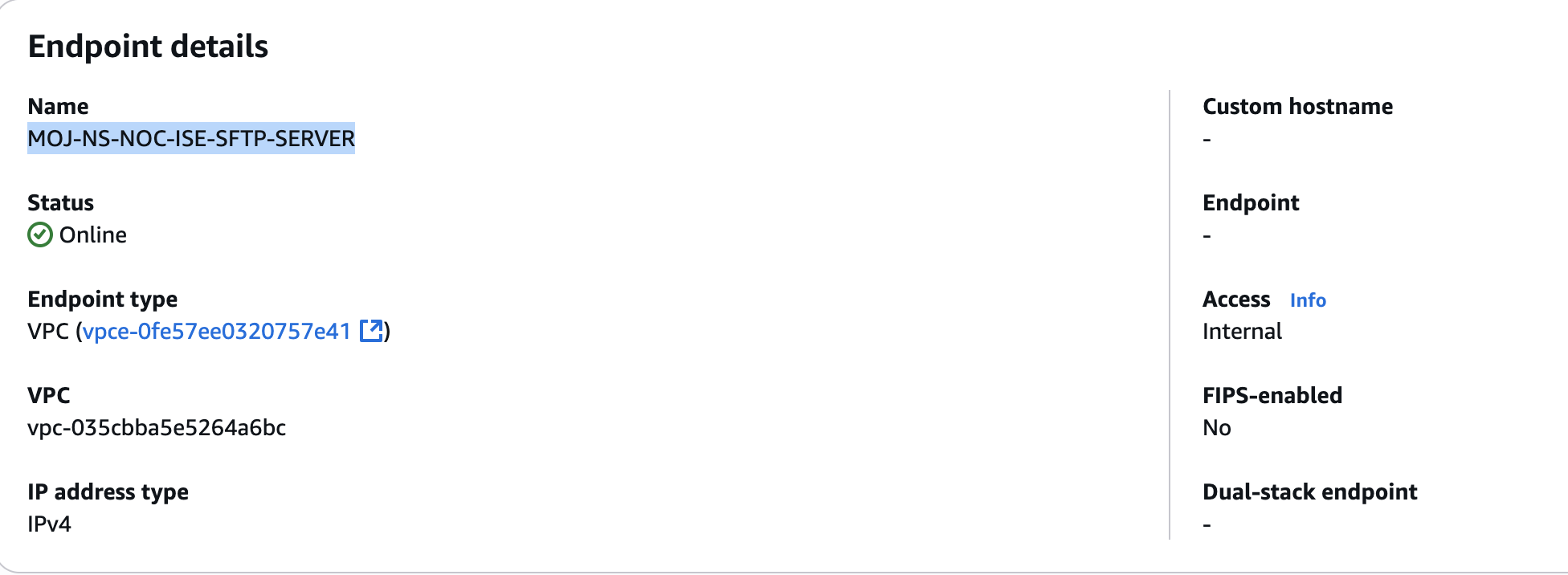
S3 bucket for tacacs backup
tacacs1 = { home_directory = "/moj-noc-prod-ise-backup/tacacs" }
Secrets Manager
Two AWS Secrets Manager secrets are used:
ise_basic_auth
Basic authentication credentials used by the TACACS failover Lambda when calling the Cisco ISE API.
ise_shared_secret
Shared secret used by the UDP health-check Lambda for RADIUS probe requests.
Route53
Two alias records are created for HTTPS traffic routing to the Network Load Balancer.
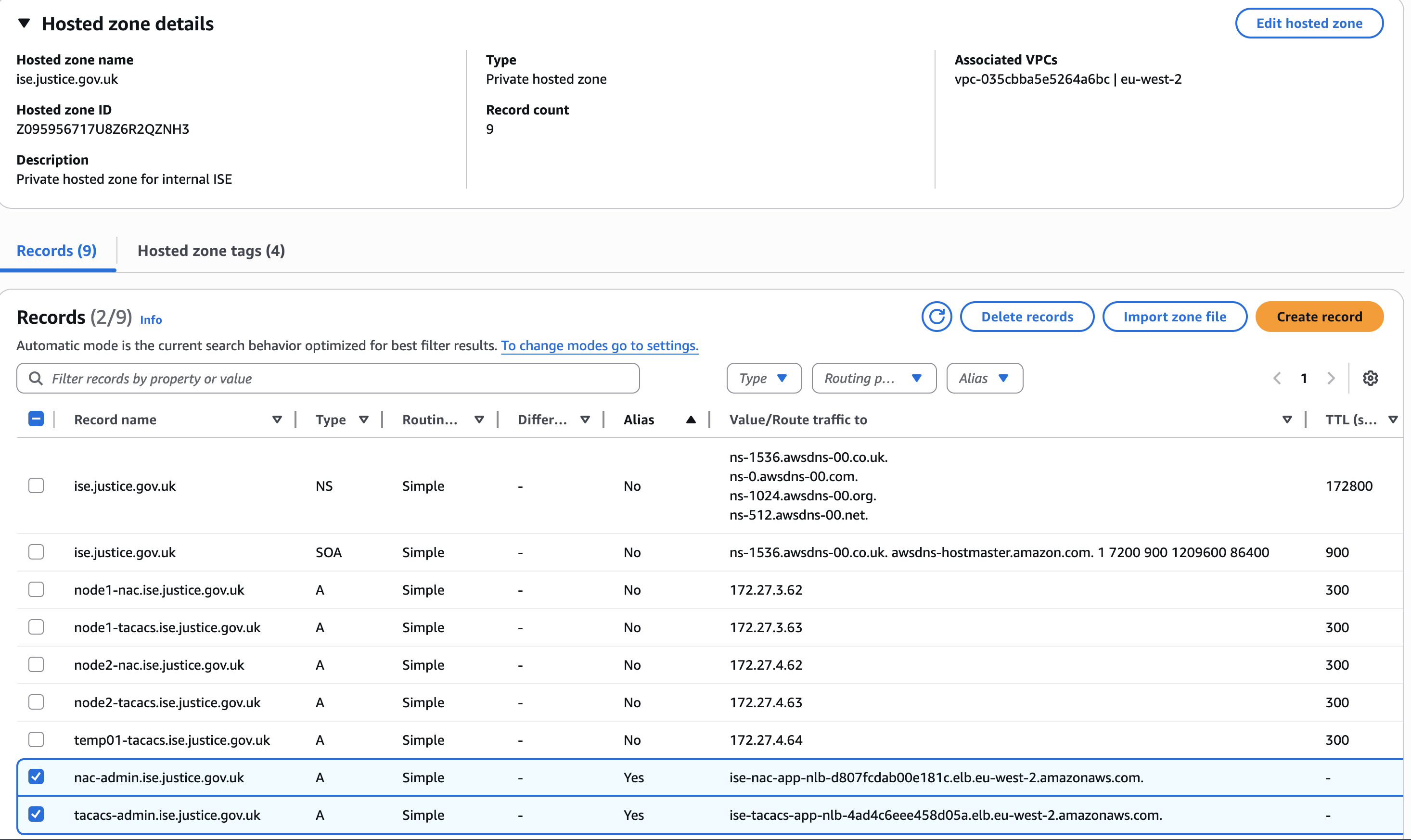
VPC Endpoints
VPC Endpoints allow the Lambda functions to communicate with AWS APIs without using the public internet.

Lambda
Lambda Source Files
lambda_files = {
  tacacs_udp = "ise_tacacs_udp_failover.py"
}
EventBridge Scheduler
Lambda functions are triggered every minute.
Previous Failover Automation Design - Admin (443) Lambda for ISE-TACACS-ADMIN-NLB target group
Originally, admin failover was designed to be handled by the Lambda function:
ise_tacacs_https_failover.py
This function queried the Cisco ISE API to determine which node was PrimaryAdmin, then dynamically registered the correct node.
Design Decision
Due to the limitations Remove Admin Load Balancer Failover Lambda, the Lambda based Admin failover logic was removed.
Admin traffic failover is now handled by:
- AWS NLB TCP health checks
- Terraform controlled active target
Health Check - UDP Lambda for ISE-TACACS-NETWORK-NLB target group
This Lambda acts as a custom health checker for two TACACS nodes. It actively tests whether each node can respond on UDP/1812 (RADIUS authentication) and then updates two load balancer target groups so that only healthy nodes receive traffic.
AWS native load balancer health checks are mainly HTTP, HTTPS, or TCP based and do not perform a real RADIUS validation on UDP/1812.
If verification is required to confirm that the RADIUS service is responding correctly, basic TCP reachability cannot be relied upon. This Lambda performs an application level check instead.
Function Overview
Fetch RADIUS Shared Secret
Retrieve the RADIUS shared secret from AWS Secrets Manager.
Health Check
Probe port 1812 with a dummy Access-Request using radtest.
Treat any valid reply as a successful response:
- Access-Accept
- Access-Reject
Health Rules
- Node is healthy if port 1812 responds
- Node is unhealthy if port 1812 does not respond
Target Group Registration
Desired state:
Nodes that successfully pass the 1812 health check.
Apply the same desired node set to both target groups:
  1812
  1813
Failure Behaviour
If both nodes fail
- Log an ALERT
- Do not modify existing target groups
If a node starts responding again on 1812
- It will be added back to both target groups during the next Lambda run
Operational Guidance
Normal Operations
Admin NLB should have only one registered target.
RADIUS/TACACS traffic dynamically adjusts based on probe results. If a node becomes unreachable, it will be temporarily deregistered and automatically re-added once healthy.
Admin NLB Failover Procedure
Admin NLB ISE-TACACS-ADMIN-NLB failover is performed through Terraform.
Terraform variable:
admin_failover_to_secondary
Normal State
admin_failover_to_secondary = false
Active node: 172.27.3.63
Failover to Secondary
Change Terraform configuration:
admin_failover_to_secondary = true
Run pipeline / Terraform apply.
Terraform will:
deregister 172.27.3.63
register   172.27.4.63
Failback
Set:
admin_failover_to_secondary = false
Apply Terraform again.
Troubleshooting
UDP probe failing
Check the following:
- RADIUS shared secret configuration
- NLB target deregistration events
- Security group rules
- Cisco ISE service status
Persistent deregistration
If both nodes appear unhealthy:
- Validate connectivity to both nodes
- Verify credentials and shared secrets
Monitoring and Alerting
CloudWatch log groups are used for Lambda logging.
The current logging level is set to:
LOG_LEVEL=INFO
To enable more detailed troubleshooting logs, change the environment variable to:
LOG_LEVEL=DEBUG
CloudWatch Log Groups
tacacs_udp = "/aws/lambda/ise-tacacs-udp-failover"