GitHub workflows
Table of contents
- Overview
- Pipeline workflows
- Reusable workflows
- Workflow summary table
- Example usage
- Running E2E Tests for PR Branches
- Troubleshooting
- References
Overview
The provider details API (legacy)‘s CI/CD process is implemented using GitHub Actions.
Deployment into Cloud Platform is implemented using helm and a Helm chart.
Pipeline workflows
- The
pipeline-pdl-pr-*.ymlworkflows automatically build, deploy and clean up preview apps for each pull request.
This helps developers to test their changes and PR reviewers to review them
before the pull request gets merged into main.
- The
pipeline-pdl-main-updated.ymlworkflow automatically versions, builds and deploys release apps built frommainfor shared or production usage.
This happens each time that main is updated, so that the latest code is
deployed quickly.
- Both of these pipelines are built from “reusable workflows” (which are the
rw-*.ymlfiles). A reusable workflow file is a bit like defining a function that can be called from the main pipeline. Reusable workflows use theon: { workflow_call: {...}}trigger, and they usually take parameters (again, like a function). However, these reusable workflow files have also been designed so they can be called manually, using theon: { workflow_dispatch: {...}}trigger. See below for more details on how to run them manually.
“Pipeline: PR opened/updated” (pipeline-pdl-pr-updated.yml)
When a pull request is opened or updated, this workflow builds the project using Gradle, runs tests, and builds a Docker image. The image is pushed to Amazon ECR container registry so it can be deployed, and from there it is deployed into Cloud Platform as a preview app in the uat namespace.
If the pull request was labelled with the label no-preview at the time that it was
created or updated, then the deployment reusable workflow is not called. Otherwise,
it is called with appropriate parameters to deploy the just-built artefacts.
“Pipeline: PR closed/merged” (pipeline-pdl-pr-closed.yml)
When the pull request is closed or merged, this workflow removes the preview app from the uat namespace and cleans up associated resources.
Manual dispatch parameters
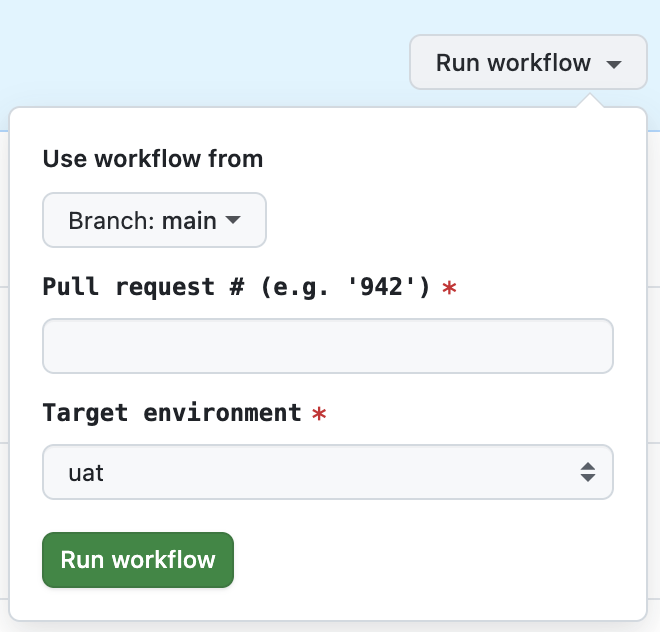
The “Pipeline: PR closed/merged” workflow can also be invoked
manually (as workflow_dispatch) in case, for example, you want to remove a
preview app without needing to close or merge the PR. When invoked manually,
you must enter which pull request to uninstall.
- Pull request #: Number of the pull request to uninstall as a preview app (for example, '893’).
- Target environment: Select the namespace to uninstall from (only uat should be available in the list)
“Pipeline: Branch main updated” (pipeline-pdl-main-updated.yml)
When the main branch is updated (for example, a PR is merged), this workflow examines
the set of commits since the last release tag:
- any breaking changes = major version increment
- any “
feat:” commits = minor version increment - any “
fix:” commits = patch version increment - no matching commits = none - i.e. don’t build and deploy
If there is a version increment, then the workflow builds the project using Gradle, runs tests, and builds a Docker image. The image is pushed to the Amazon ECR container registry so it can be deployed.
If a build and push succeeds, then a Git tag is pushed to the origin and a GitHub release with automatic release-notes is created to describe the release.
The release app is tagged, built and deployed into Cloud Platform automatically. The release app is deployed to the dev namespace, then to the uat namespace if that succeeded. Before deploying to the staging namespace, the end-to-end tests must pass. Currently, deployment to the prod namespace is triggered manually.
Manual dispatch parameters
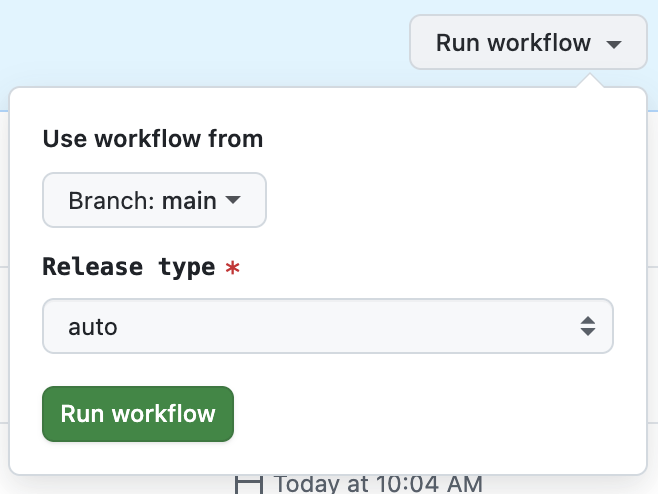
The “Pipeline: Branch main updated” workflow can also be invoked
manually (as workflow_dispatch) in case, for example, you want to build and
deploy a change that did not automatically cause a new release, or some
environmental factor prevented a build from succeeding previously has now
been resolved.
- Release type: Which element of the tag version to increment (select auto to decide based on commit history, otherwise patch, minor or major).
Reusable workflows
The pipeline workflows make use of a number of reusable workflows (as workflow_call),
which can also be invoked manually (as workflow_dispatch) to perform individual tasks.
“Reusable workflow: Build, push & publish” (rw-pdl-build.yml)
The Gradle root project and its subprojects are built using the same command-line that developers use for local development:
./gradlew clean build integrationTest
which causes compilation, packaging (assemble), style-checking (checkstyleMain), unit
tests (test), and integration tests (integrationTest) to execute.
The Docker image (which is OCI-compatible) is built using the command-line:
./gradlew bootBuildImage --imageName="host/namespace/repository:tag"
which can also be run by developers doing local development.
This is then pushed using the docker push command-line into Amazon ECR with either
one or two image tag names.
For a PR build of, say, pull request #999 with tip commit c033174, these tags are named
like pr-999 (this tag is moveable and moves each time the PR is updated) and
pr-999-c033174 (this tag is immutable and always points at the same version build).
For a main build, a version tag like v1.4.2 is determined from the release type and
the last version tag found. The Git repository is tagged with this version, and a GitHub
Release is created with release notes.
Manual dispatch parameters
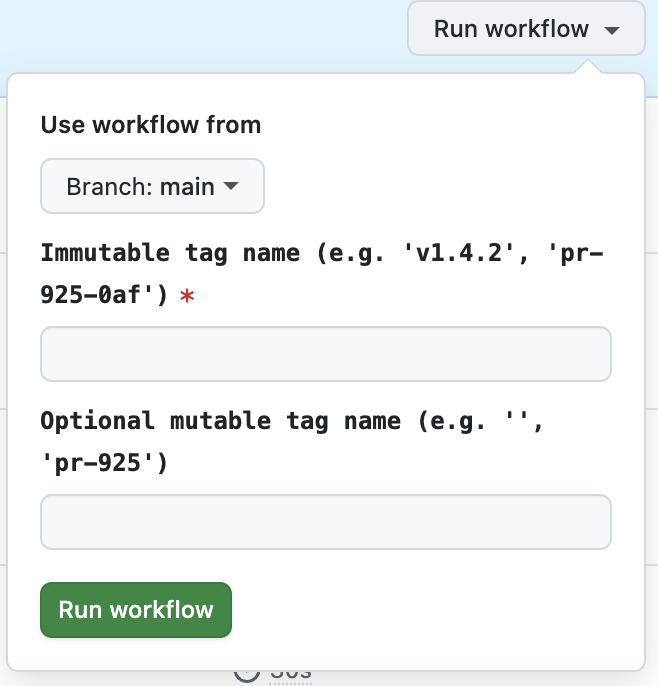
The “Reusable workflow: Build & push” workflow can also be invoked manually (as
workflow_dispatch) in case, for example, you want to build and push a branch or
main without necessarily deploying.
- Immutable tag name: Primary image tag name that will also be used for deployment
- Optional mutable tag name: An optional secondary image tag that’s easier to use
“Reusable workflow: Deploy PR” (rw-pdl-deploy-pr.yml)
This workflow deploys the Docker image with tag pr-{number} as a preview app,
intended as a temporary application for reviewing a pull request.
Manual dispatch parameters
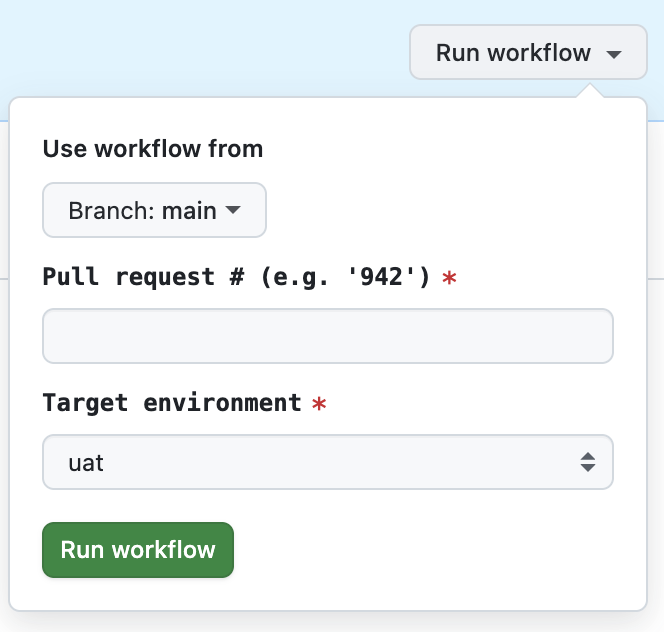
The “Reusable workflow: Deploy PR” workflow can also be invoked
manually (as workflow_dispatch) in case, for example, you want to deploy a
preview app without needing to push a change to it (uses the latest movable
tag). When invoked manually, you choose which pull request to install.
- Pull request #: Number of the pull request to deploy as a preview app (for example, ‘893’ - no leading ‘pr-’ or ‘#’ needed).
- Target environment: Select the namespace to deploy to (only uat should be available in the list)
“Reusable workflow: Deploy main” (rw-pdl-deploy-main.yml)
This workflow deploys the specified Docker image as a release app, intended for shared testing or production usage, depending on the environment.
Manual dispatch parameters
The “Reusable workflow: Deploy main” workflow can also be invoked
manually (as workflow_dispatch) in case, for example, you want to deploy a
release app - for example, to prod (which is not deployed to
automatically). When invoked manually, you specify the release tag and can
choose which environment(s) to install into.
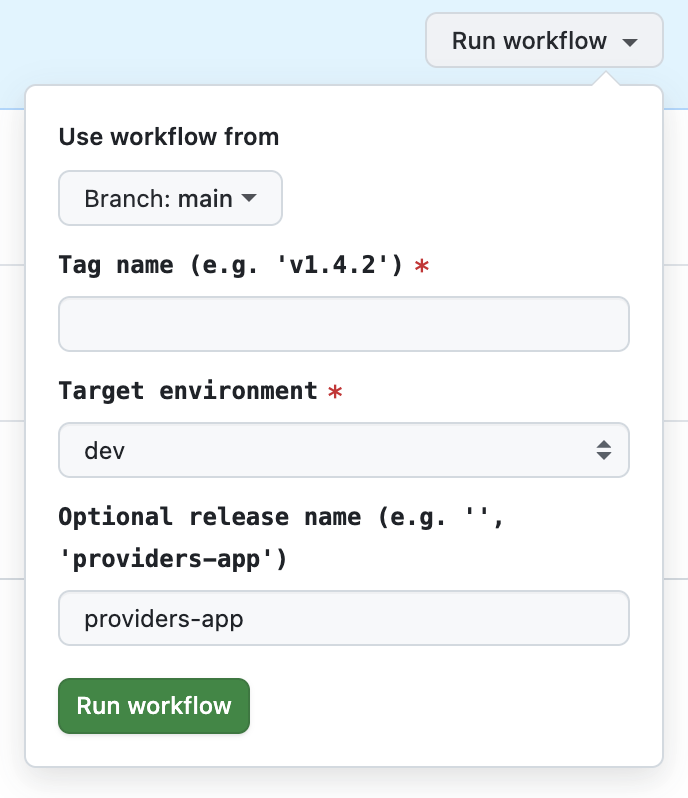
- Tag name: Release tag to deploy (e.g.,
v1.2.3) - Target environment: Select from dev, uat, staging or prod
- Optional release name: Leave this blank (or as
providers-app) for now
Workflow summary table
| Filename | Workflow name | Usage |
|---|---|---|
pipeline-pdl-pr-updated.yml |
Pipeline: PR opened/updated | Triggered by a new or updated PR |
pipeline-pdl-pr-closed.yml |
Pipeline: PR closed/merged | Triggered by a closed or merged PR |
pipeline-pdl-main-updated.yml |
Pipeline: Branch main updated | Triggered by pushes to main
|
rw-pdl-build.yml |
Reusable workflow: Build, push & publish | Called by both pipeline-pdl-*-updated.yml pipelines |
rw-pdl-deploy-pr.yml |
Reusable workflow: Deploy PR | Called by pipeline-pdl-pr-updated.yml
|
rw-pdl-deploy-main.yml |
Reusable workflow: Deploy main | Called by pipeline-pdl-main-updated.yml
|
Example usage
Pull request
Developer opens a pull request.
pipeline-pdl-pr-updated.ymlruns: it builds and pushes Docker image tags (for example,pr-999,pr-999-abc123). If the PR is not labeled with no-preview then it is deployed as a preview app.Reviewer tests the preview app.
Once the reviewer approves the PR, the developer merges or closes the PR.
pipeline-pdl-pr-closed.ymlruns to clean up the preview app.
Merge to main
Developer merges a PR to
main.pipeline-pdl-main-updated.ymlchecks commit messages:
- `feat:` → `minor` version bump
- `fix:` → `patch` version bump
- breaking change → `major` version bump
If bumped, the Docker image is built and tagged as a release.
The pipeline then deploys the release app to dev, uat and staging.
- The developer can manually deploy to prod if desired.
Running E2E Tests for PR Branches
This section explains how to manually run the “Reusable workflow: End-to-end test” workflow against a PR preview app or a release environment.
Overview (E2E tests)
The “Reusable workflow: End-to-end test” GitHub Actions workflow executes end-to-end (E2E) tests for the provider details API (legacy) against a release in a chosen namespace (uat, staging, prod) or a PR preview app in uat.
It runs the test suite defined in /providers-e2e using JUnit and
RestAssured, verifying that deployed API endpoints behave as expected.
How it works (E2E tests)
When triggered, the workflow:
- Checks out the branch that triggered or was selected in the run (usually the PR branch).
- Sets up Java 25 (Temurin distro) and Gradle.
- Authenticates with the correct namespace (uat, staging, prod).
- Port-forwards the API service (e.g.
providers-apporpr-913-providers-app) tolocalhost:18080. - Runs the E2E tests against
http://127.0.0.1:18080.
Input parameters (E2E tests)
| Input | Description | Example | Required |
|---|---|---|---|
| target | Target environment to run tests against. | uat, staging, prod | ✅ |
| rel | Optional release name for Helm deployment. Leave empty to test main service. | pr-913 |
❌ |
| servicePort | Optional service port to forward (default: 8080). | 8080 |
❌ |
💡 Example: if rel =
pr-913, the workflow targets the service namedpr-913-providers-app.
Running from the GitHub UI (E2E tests)
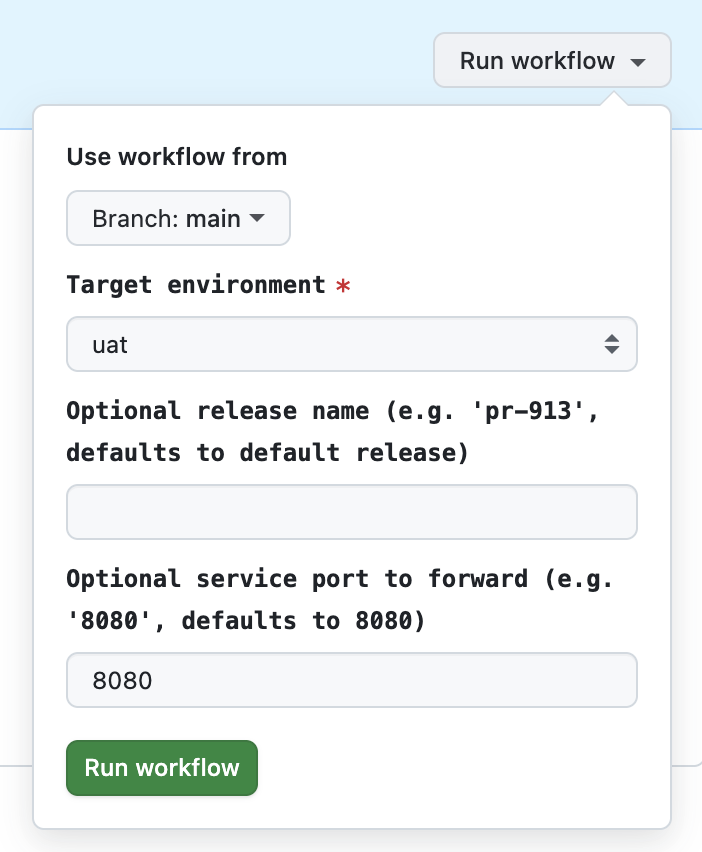
Navigate to Actions > Reusable workflow: End-to-end test in the repository
Click Run workflow dropdown menu button (top-right of page)
In the workflow dispatch form that opens from the menu button, select your PR branch (this ensures the workflow checks out your PR’s code). Now fill in the form fields:
- Target environment: Leave as uat
- Optional release name: Enter
pr-<your PR number>(e.g.pr-913) - Optional service port to forward: Leave as
8080
- Click the Run workflow action button at the bottom of the form
The workflow will now:
- Check out your PR branch.
- Connect to the matching preview deployment.
- Execute the full E2E suite.
Example run (E2E tests)
| Scenario | environment | preview | Branch | Description |
|---|---|---|---|---|
| PR Preview | uat | pr-913 |
feature/add-cache-fallback |
Tests your PR deployment |
| UAT Main | uat | (empty) | main |
Tests the stable UAT service |
| Staging | staging | (empty) | main |
Tests staging environment |
Troubleshooting
Problem: Preview app did not deploy
Solution:
- Ensure that the
no-previewlabel is not set on the PR. - If you removed the label, confirm the GitHub Actions workflow ran. Note that it is necessary to push a commit (after removing the label) to cause the workflow to run.
- Check workflow logs for errors.
Problem: Release workflow did not trigger after merging to main
Solution:
- Check if your commit message matches the expected conventional commits
type (
feat:,fix:, etc.) for the version bump. - If no version increment was detected, try manual dispatch and override the Release type input.
Problem: Docker image build or push failed
Solution:
- Look for errors in Gradle or Docker steps in the workflow logs.
- Ensure your branch has not exceeded the ECR tag limit.
Problem: Preview or release app is stuck in previous state or not updated after workflow finishes
Solution:
- Check if the correct immutable or movable image tag was used by the deployment workflow.
- Look for deployment errors or timeouts in workflow logs.
- Manually run the “Pipeline: PR closed/merged” workflow to clean up old deployments, then redeploy.
Problem: Release tags or GitHub Releases are not created / are missing\
Solution:
- Ensure your commit messages match the expected conventional format for version bumps.