SSO Architecture Runbook
Purpose
This runbook documents the current Single Sign-On (SSO) architecture used across Engineering services. It provides a clear reference for authentication flows, control planes, and trust relationships.
Audience
This runbook is primarily for:
- Developer Experience (DevX) engineers: to operate and debug the shared SSO integration (Auth0, supported GitHub organisations, and service-provider app mappings).
- Developers using supported services: to understand the authentication path and common failure points during onboarding or incident triage.
- Security and platform stakeholders: to understand trust boundaries, ownership, and operational controls.
This document is not intended to be a full implementation guide for custom SSO setups managed outside Developer Experience (DevX) Team.
Auth0 Tenant
Region: EU Tenant: Operations Engineering
Auth0 acts as the central SSO broker across all integrated services.
Architecture Overview
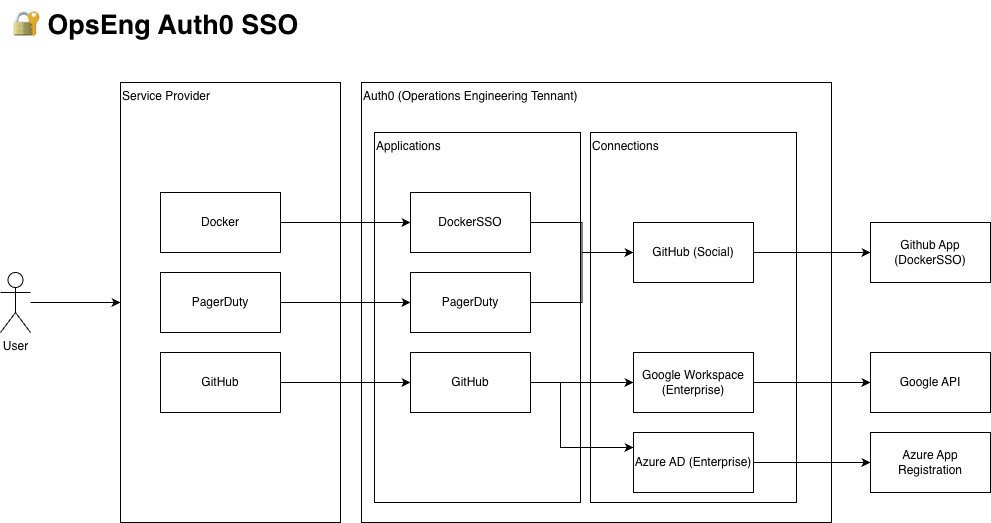
Service Providers (SP)
The following services initiate authentication:
- Docker
- PagerDuty
- GitHub
Users access these services directly, which then delegate authentication to Auth0.
Auth0 (Central Broker)
Auth0 manages authentication and routes users to appropriate identity providers.
Applications
DockerSSOPagerDutyGitHub
Connections
- GitHub (Social)
- Google Workspace (Enterprise)
- Azure AD / Entra ID (Enterprise)
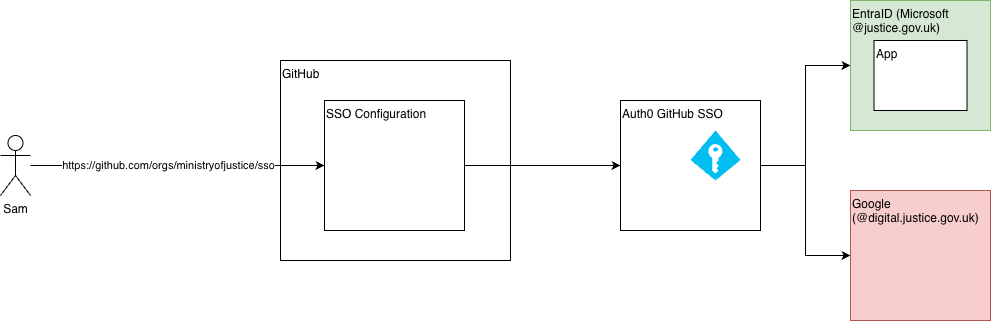
GitHub SSO Flow (Enterprise)
Entry point:
Identity Providers
Users authenticate via:
- Entra ID (Azure AD) →
@justice.gov.uk - Google Workspace →
@digital.justice.gov.uk
Auth0 brokers authentication between GitHub and these providers.
GitHub Enterprise Structure
Enterprise: ministry-of-justice-uk
Organisations
- Criminal Injuries Compensation Authority
- Judicial Appointments Commission UK
- Justice AI Unit
- Ministry of Justice
- ministryofjustice-test
- MOJ Analytical Services
- MOJ Analytical Services External
SSO support scope
The enterprise contains organisations with different support ownership models.
| Organisation | SSO enabled | Support ownership |
|---|---|---|
| Criminal Injuries Compensation Authority | Yes | DevX (supported) |
| Judicial Appointments Commission UK | Yes | DevX (supported) |
| Ministry of Justice | Yes | DevX (supported) |
| ministryofjustice-test | Yes | DevX (supported) |
| MOJ Analytical Services | Yes | DevX (supported) |
| MOJ Analytical Services External | Yes | DevX (supported) |
| Justice AI Unit | Yes | Custom setup (outside DevX support) |
If ownership changes, update this table as part of the same change and inform #developer-experience-team.
SSO Enforcement
- Enforced at organisation level
- Configured via Auth0 integration
- Entry point:
/orgs/ministryofjustice/sso
Current State Summary
- Auth0 (EU – Operations Engineering) is the central SSO broker
- Docker uses GitHub Social connection via DockerSSO
- PagerDuty uses Auth0 application
- GitHub Enterprise uses Auth0 for organisation SSO
- Azure AD and Google Workspace provide enterprise identity
- GitHub Social is used specifically for Docker authentication
- Multiple organisations sit under a single GitHub enterprise
The architecture is evolving toward:
- Standardisation
- Stronger security controls
- Audit readiness
Operational Notes
Changes to SSO flows should be validated across:
- Auth0 application mappings
- GitHub organisation SSO settings
- Identity provider configurations
Misconfiguration in any control plane can break authentication across multiple services
Always test changes in a controlled environment where possible
Session & Token Lifetimes
Session and token lifetimes are configured in Auth0 and at the GitHub organisation level. Use the table below to find exact values quickly during debugging.
| Token / Session | Default (if not overridden) | Where to check | Why it matters in incidents |
|---|---|---|---|
| Auth0 ID Token lifetime | 36,000 seconds (10 hours) | Auth0 Dashboard → Applications → [App name] → Settings → Advanced → OAuth | Expired ID tokens can cause forced reauthentication in browser-based flows. |
| Auth0 Access Token lifetime | 86,400 seconds (24 hours) | Auth0 Dashboard → APIs → Settings | Expired access tokens can break API calls while the user appears logged in. |
| Auth0 refresh token idle lifetime (when refresh token expiration is enabled) | 2,592,000 seconds (30 days) | Auth0 Dashboard → Applications → [App name] → Settings → Refresh Token Expiration | Determines how long a refresh token can sit unused before reauthentication is required. |
| Auth0 session idle timeout | 3 days (default), up to 100 days | Auth0 Dashboard → Tenant Settings → Advanced → Login Session Management | Idle timeout explains logouts after inactivity. |
| Auth0 absolute session lifetime | 30 days (default), up to 365 days | Auth0 Dashboard → Tenant Settings → Advanced → Login Session Management | Absolute lifetime explains hard logouts despite user activity. |
| GitHub organisation SSO session | Generally 24 hours (defined by IdP session policy) | GitHub → Organisation → Settings → Authentication security (and IdP session policy) | Expiry can require users to re-authorise SSO for organisation resources. |
During triage, capture the configured value and observed expiry time in incident notes to confirm whether expiry, not permissions, caused the failure.
These are platform defaults and common baselines; the configured value in your tenant/organisation always takes precedence.
Key Rotation
SSO depends on signing keys managed by upstream identity providers and trust metadata consumed by Auth0/GitHub.
What rotates
- Entra ID signing keys used to sign authentication responses.
- Google Workspace signing keys used for enterprise identity assertions.
- Any client secrets/certificates configured for enterprise connections.
Operational guidance
- Monitor for key rollover notices from Entra ID and Google.
- Ensure Auth0 connections use metadata/JWKS-based configuration where possible so new signing keys are discovered automatically.
- After announced rollover windows, test end-to-end login for both
@justice.gov.ukand@digital.justice.gov.ukusers. - If validation failures occur, check Auth0 logs for signature/key ID mismatch errors.
- Escalate ownership-specific failures to the relevant control-plane owner (DevX, Tech Services, or Google Workspace administrators).
Troubleshooting
User cannot authenticate via SSO
- Confirm the user’s email domain matches an expected identity provider (
@justice.gov.uk→ Entra ID,@digital.justice.gov.uk→ Google Workspace). - Check Auth0 logs: Auth0 Dashboard → Monitoring → Logs for failed login events.
- Verify the relevant Auth0 connection is enabled for the target application.
- Confirm the user account exists and is active in the upstream identity provider (Entra ID / Google Workspace).
User authenticated via Auth0 but is not a member of the GitHub organisation
- Navigate to https://github.com/orgs/ministryofjustice/sso and check if the user appears as pending or linked.
- Ask the user to complete the GitHub SSO authorisation step by visiting the entry point URL above.
- If the user is already a member but cannot access resources, check if they have authorised the OAuth app for the organisation.
Auth0 connection failure
- Check identity provider status (Azure status page / Google Workspace Status Dashboard).
- Verify enterprise application / client credentials in Auth0 have not expired.
- Review Auth0 connection settings for the affected provider.
Escalation
Raise issues in #developer-experience-team on Slack.
ADR Reference
If an Architecture Decision Record (ADR) exists for the SSO design or a significant change to this architecture, link it here.
- ADR index — view all recorded architecture decisions for the Developer Experience team
If no ADR exists for this architecture, consider creating one to document the rationale for the current SSO design. See ADR-000 for the format.